Summary
Problem: users wanted to reach new audiences on video platforms but felt overwhelmed by the technical process.
Solution: we built a video interface seamlessly integrated into our well-loved audio editing workflow—adding new functionality without introducing complexity or clutter.
Impact:
- Achieved high usability scores (6+/7 SEQ) and 100% task completion across all test flows
- Generated strong beta sign-up interest
- Successfully launched an additional video tier, enabling upsell opportunities and increasing ARPU
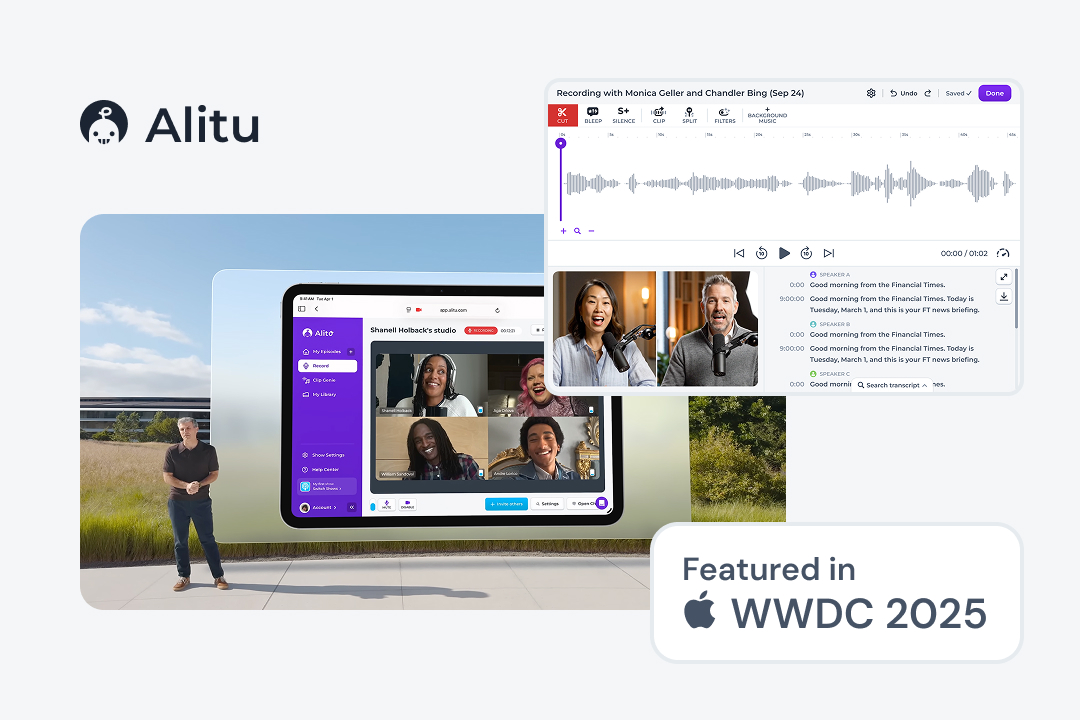
- Contributed to the company’s acquisition by a Y Combinator and Bloomberg Beta-backed organization, alongside a feature at Apple’s WWDC 2025.
Context & Opportunity
Internal research revealed our users’ primary goal was audience expansion, but they lacked the technical skills to leverage the industry shift toward video (Spotify, YouTube). Small podcasters were stuck choosing between complex video editing software or missing out on these new audiences entirely. I saw an opportunity to simplify video podcasting by making it as approachable as our winning audio-editing formula.
Who We’re Solving For
Solo creators, coaches, hobbyists, and small business owners who want to reach video audiences but lack the time and technical expertise.
Why it mattered
| Business need | User need |
|---|---|
| Unlocking a new “Video Tier” allowed us to increase average revenue per user (ARPU) | Reach new audiences without tripling production time. |
| Reduce churn | Feeling able and empowered to repurpose content for YouTube and Spotify for Podcasters |
| Increase platform stickiness and lifetime value (LTV) | A way to produce video podcasts consistently without the need for extra tools or leaving our “easy” environment. |
Success criteria
- Maintain Alitu’s “easiest to use” rating while adding complex video features.
- Eliminate the need for third-party tools in the users’ workflow. Consolidate a 5-tool workflow into 1-tool workflow.
- Increase revenue by providing a new video plan.
Hypothesis
If we remove the technical barrier to video podcasting, then current and new users will want to create video shows and upgrade to our new Video tier. This will increase ARPU, improve platform stickiness (LTV), and reduce churn.
Core Challenges
| Design Challenge | Business Challenge |
|---|---|
| Integrate a video workflow into an established audio editing workflow while maintaining the well-loved ease of use | Support Video plan upsell. Increase average revenue per user (ARPU) |
| Provide powerful video editing features without adding complexity | Increase platform stickiness and lifetime value (LTV) |
| Make video podcasting sustainable for video podcasters long-term | Reduce churn to direct competitors offering video functionality |
Research & Insights
My research was focused on uncovering and understanding the problems podcasters face in regards to video podcasting. My objective was to map the gap between their desire for growth and their fear of technical complexity, ensuring I didn’t design just another Premiere Pro clone.
Methods
- User interviews (n = 8)
- Survey (n = 128)
- Support tickets (desk analysis)
Key insights
| Insight | Design implications |
|---|---|
| Users struggled to make videos look professional and on-brand. | A tool was conceived that creates polished intros and outros using the user’s existing podcast artwork or brand assets — removing major production bottleneck. |
| Technical jargon and complex video tools increased cognitive load and made video production seem less feasible. | I kept only the tools essential for video podcasting and removed jargon from the app. For example I removed the export settings menu entirely and let the system pick the best settings. This greatly reduced decision fatigue. |
| Moving huge video files between Zoom, Dropbox and video editing software is really time-consuming | I integrated the workflow directly with our built-in video recorder, drastically cutting down total production time. |
| Although AI tools helped with editing, they almost always required some human supervision | I made sure all AI edits such as removing silence or umms were non-destructive and easy to undo so the user felt in control. |
| Crafting captions and uploading the video to each platform is tedious and requires a lot of coordination. | The publish interface was designed to streamline the process. Integrations with popular platforms reduced the need to juggle multiple tabs and helped prevent errors. |
Analysis
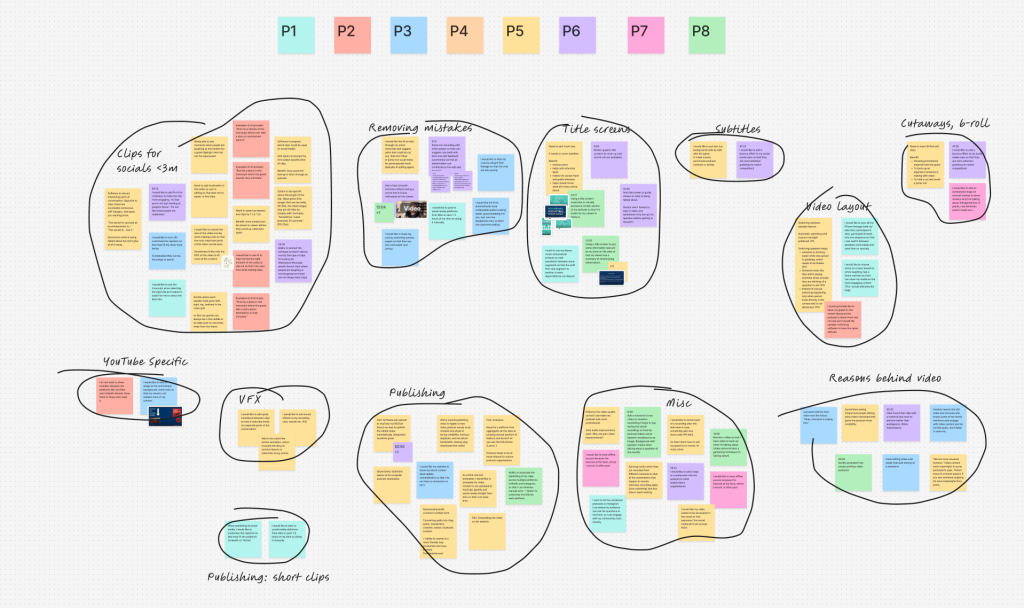
To distil meaningful insights from the qualitative data, I conducted a thorough thematic analysis of the user interviews. By actively listening to the recordings, I extracted compelling user stories that highlighted key behaviours and pain points. I then clustered these observations into distinct themes, allowing me to identify broader patterns and uncover actionable opportunities to refine the user experience.
Persona
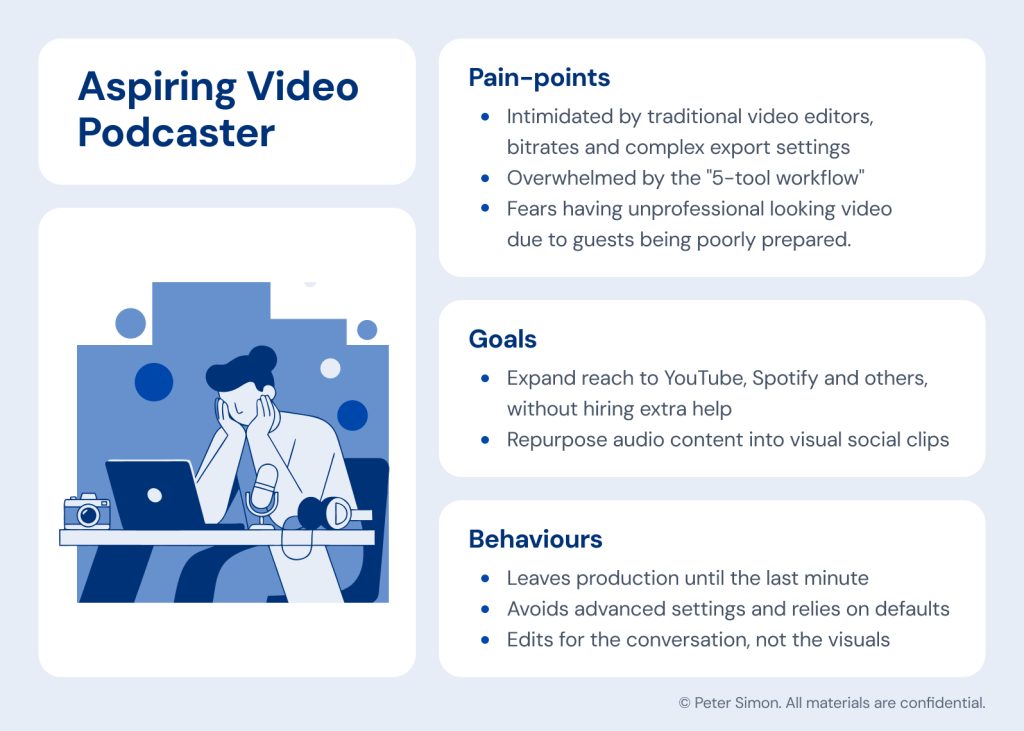
To ensure the design remained deeply rooted in user needs, I developed a primary persona to anchor the project. By clearly mapping their unique goals, observable behaviours and daily pain points, this archetypal user served as a constant touchstone for me and the team.
Early exploration
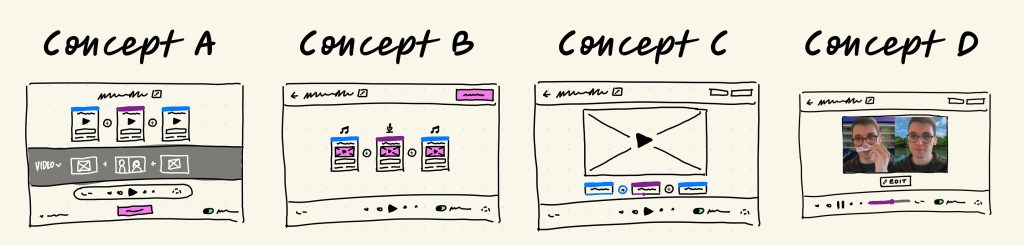
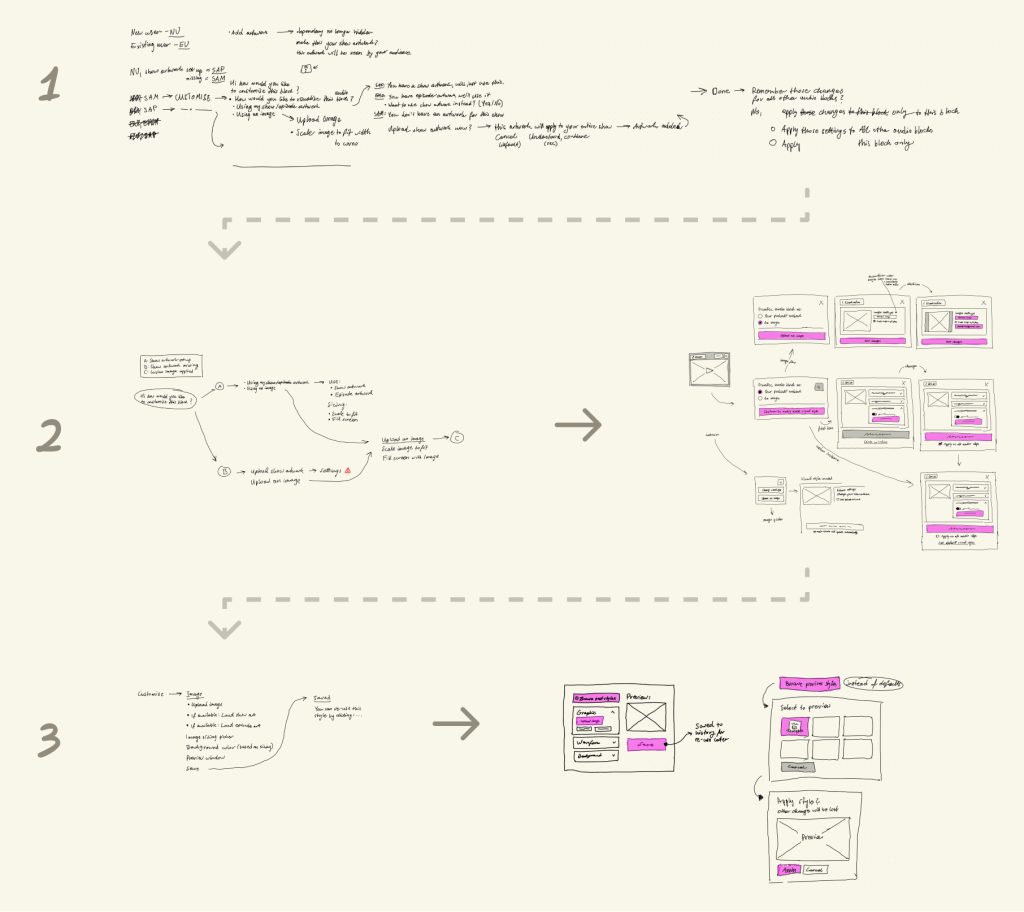
The early concepts explored how video could be integrated in to the current audio workflow, without adding extra complexity or removing anything from the audio experience.
The fat marker sketches helped me visualise different ways of doing that and simultaneously talk through technical constraints and feasibility with the engineering team. This helped me ensured that the designs were feasible and on scope from the very beginning.
Most podcasts begin with an intro. It is a short clip that helps introduce the podcaster, their show and most crucially their brand. Our research found that creating these clips is a major bottleneck for creators who often lack the technical expertise to produce them.
To address this problem I explored flows that would let users create polished and on-brand clips with little to no effort:
Iteration Notes
Users consistently ignored mechanisms like ‘Apply to all’ or ‘Set as default’ when creating intro clips, even though they prevented duplicate work.
The original ‘set as default’ toggle was designed to help users maintain consistent intros, but it lacked discoverability. In testing, 4 out of 5 users missed it entirely. To solve this, I introduced a ‘history’ section, leveraging the familiar mental model of a browser history. By automatically saving all intro configurations, I removed a decision point from the creation flow which helped reduced the cognitive load. While accessing the history required one extra click, the redesign significantly improved feature awareness and translated to time savings for the user.
Intro Customisation flow lacked adequate discoverability
During user testing, participants frequently struggled to edit their intro clips because the ‘Customise’ button was hidden away inside the intro block. To resolve this discoverability issue, I moved the button to sit directly on top of the intro clip itself. This redesign applied Don Norman’s principle of direct mapping, establishing a clear and immediate connection between the UI control and the object being modified. Bringing this action to the forefront drastically improved discoverability, resulting in higher task completion rates and a much stronger SEQ score for the overall flow.
Before & After: User Journey Map
Since this work focused on improving the workflow of video podcasting, I synthesised the research into an as-is journey map. This helped me identify and communicate the areas which our solution needed to improve upon.
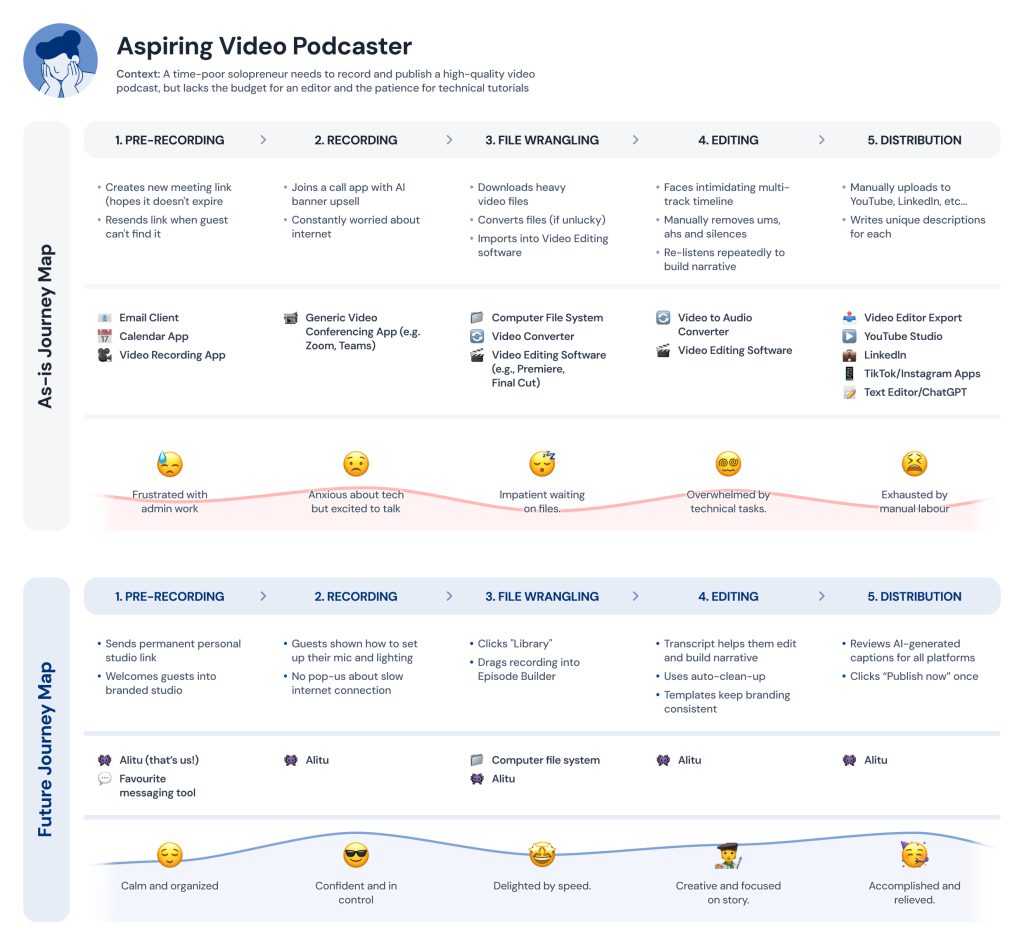
The future journey map shaped the vision of what I wanted our final solution to deliver. Many of the required tools were reduced to just one and this had a direct impact on customers’ affect throughout the flow.
Final Solution
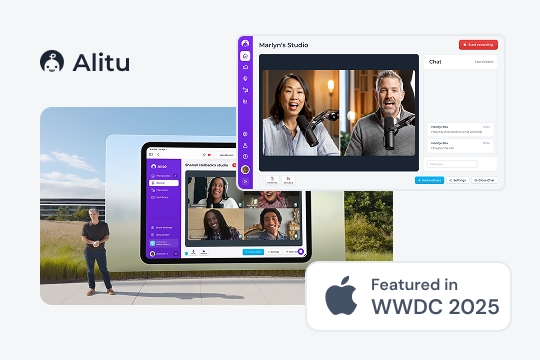
Users can start recording directly within their studio. This seamless approach caught Apple’s attention, leading them to feature the interface during WWDC 2025 to showcase the new microphone selection control in new iPadOS:
If slow internet delays guest uploads, Alitu keeps the user fully informed to reduce anxiety:
Next, users can easily add their favourite music and arrange their recorded tracks:
To ensure brand consistency, creators can generate a custom, professional intro:
Shape the episode’s story by editing the text directly, or via timeline — whatever the moment calls for.
And there’s plenty more to explore. Please reach out if you would like a deeper dive into the platform!
Design Principles and Theory Used
- Progressive disclosure
- Information foraging theory (IFT)
- Reduce cognitive load
- Familiar mental models
Impact
| Goal | Result |
|---|---|
| Maintain simplicity even with a complex video workflow | The SEQ scores for all flows were excellent (6+ out of 7) along with perfect task completion. |
| Consolidate a 5-tool workflow | Tools needed: 5 → 1 |
| Increase ARPU by creating new video tier | Functionality justified addition of a new tier which enabled an extra 9$ of value per customer, per month. |
Results
- The feature achieved excellent usability metrics, with a 100% task completion rate across 14 usability tests. The Single Ease Question (SEQ) score for the video episode building flow averaged 6.6/7, while the publishing flow scored 6.7/7.
- Led to the company being acquired by Bloomberg Beta and Y-Combinator backed SF company.
- The end design was featured in Apple’s WWDC 2025.
Key learnings:
- Make as many decisions for people as possible. Offer smart defaults first, then let people customise once they are more familiar with the interface. Flows with fewer steps always perform better because short term memory prefers them.
- Use familiar mental models to your advantage, especially when introducing a novel concept. If something works similarly to what has been on the web for years, the learnability of the interface is greatly improved.
- People do not like to read. Text taller than two lines will always be a struggle. People forage for keywords so prefer familiar UX language such as Save as, Cancel and Agree. Strengthen information scent with titles, bold text and clear labels.